Arc Widget
Overview
The Arc widget draws a circular arc (partial ring) and can be used as a progress ring, a dial, or an interactive value selector. It supports configurable start/end angles, thickness, rounded ends, and an optional interactive knob.
Enable
Creation
mgui_widget_t* arc = mgui_allocate_widget(
    parent,
    MGUI_WIDGET_ARC,
    (mgui_area_t){x, y, width, height},
    MGUI_COLOR_BLACK
);
API Reference
Angles & Geometry
// Set arc span (0° = 3 o'clock, clockwise)
mgui_widget_arc_set_angles(arc, int16_t start_angle, int16_t end_angle);

// Set radius (in pixels from center)
mgui_widget_arc_set_radius(arc, int16_t radius);

// Set ring/stroke thickness
mgui_widget_arc_set_thickness(arc, uint8_t thickness);

// Round the end caps
mgui_widget_arc_set_rounded_ends(arc, true);
Value (progress / dial mode)
// Set value range
mgui_widget_arc_set_range(arc, int16_t min, int16_t max);

// Set current value
mgui_widget_arc_set_value(arc, int16_t value);

// Read current value
int16_t v = mgui_widget_arc_get_value(arc);
Interactive Mode
// Allow user to drag the knob
mgui_widget_arc_set_interactive(arc, true);

// Knob circle radius
mgui_widget_arc_set_knob_size(arc, uint8_t size);
Colors
// background_color = background track, progress_color = filled part
mgui_widget_arc_set_colors(arc, MGUI_COLOR_DARK_GRAY, MGUI_COLOR_CYAN);
Events (interactive arc)
static void arc_changed(mgui_widget_t* obj, mgui_event_t event) {
    if (event & MGUI_EVENT_CHANGE) {
        int16_t v = mgui_widget_arc_get_value(obj);
        // use v
    }
}
mgui_widget_click_handler(arc, arc_changed);
Examples
Static Progress Ring (Battery Level)
Green ring on a dark track centered on screen — a classic battery or fuel gauge.
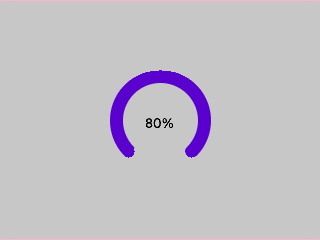
{
  "elements": [
    {
      "type": "box",
      "name": "Screen",
      "x": 0, "y": 0, "w": 320, "h": 240,
      "color": "0x1A1A1A",
      "children": [
        {
          "type": "arc",
          "name": "BatteryArc",
          "x": 100, "y": 60, "w": 120, "h": 120,
          "color": "0x000000",
          "angles": { "start": 135, "end": 405 },
          "arc_radius": 50,
          "arc_thickness": 12,
          "rounded_ends": true,
          "range": { "min": 0, "max": 100 },
          "value": 80,
          "arc_colors": { "background": "0x333333", "progress": "0x22BB22" },
          "children": [
            {
              "type": "label",
              "name": "BatLabel",
              "x": 30, "y": 50, "w": 60, "h": 20,
              "color": "0xFFFFFF",
              "align": "MGUI_ALIGN_CENTER",
              "text": "80%"
            }
          ]
        }
      ]
    }
  ]
}
mgui_widget_t* battery_arc = mgui_allocate_widget(
    screen, MGUI_WIDGET_ARC,
    (mgui_area_t){0, 0, 120, 120},
    MGUI_COLOR_BLACK);
mgui_widget_align(battery_arc, MGUI_ALIGN_CENTER);
mgui_widget_arc_set_angles(battery_arc, 135, 405);
mgui_widget_arc_set_radius(battery_arc, 50);
mgui_widget_arc_set_thickness(battery_arc, 12);
mgui_widget_arc_set_rounded_ends(battery_arc, true);
mgui_widget_arc_set_range(battery_arc, 0, 100);
mgui_widget_arc_set_value(battery_arc, 80);
mgui_widget_arc_set_colors(battery_arc, MGUI_COLOR_DARK_GRAY, MGUI_COLOR_GREEN);

mgui_widget_t* bat_lbl = mgui_allocate_widget(
    screen, MGUI_WIDGET_LABEL,
    (mgui_area_t){0, 0, 120, 120},
    MGUI_COLOR_BLACK);
mgui_widget_label_set_text(bat_lbl, "80%");
mgui_widget_align(bat_lbl, MGUI_ALIGN_CENTER);
mgui_widget_color_change(bat_lbl, MGUI_COLOR_WHITE);
Interactive Volume Dial
Orange arc with a draggable knob — displays current volume and fires a callback on change.
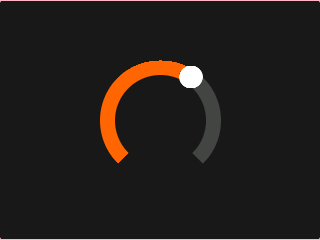
{
  "elements": [
    {
      "type": "box",
      "name": "Screen",
      "x": 0, "y": 0, "w": 320, "h": 240,
      "color": "0x1A1A1A",
      "children": [
        {
          "type": "arc",
          "name": "VolDial",
          "x": 90, "y": 50, "w": 140, "h": 140,
          "color": "0x000000",
          "angles": { "start": 135, "end": 405 },
          "arc_radius": 60,
          "arc_thickness": 14,
          "range": { "min": 0, "max": 100 },
          "value": 50,
          "interactive": true,
          "arc_knob_size": 25,
          "arc_colors": { "background": "0x444444", "progress": "0xFF6600", "knob": "0xFFFFFF" }
        }
      ]
    }
  ]
}
static void vol_dial_cb(mgui_widget_t* obj, mgui_event_t event) {
    if (event & MGUI_EVENT_CHANGE) {
        int16_t v = mgui_widget_arc_get_value(obj);
        set_system_volume(v);
    }
}

mgui_widget_t* vol_dial = mgui_allocate_widget(
    screen, MGUI_WIDGET_ARC,
    (mgui_area_t){0, 0, 140, 140},
    MGUI_COLOR_BLACK);
mgui_widget_align(vol_dial, MGUI_ALIGN_CENTER);
mgui_widget_arc_set_angles(vol_dial, 135, 405);
mgui_widget_arc_set_radius(vol_dial, 60);
mgui_widget_arc_set_thickness(vol_dial, 14);
mgui_widget_arc_set_range(vol_dial, 0, 100);
mgui_widget_arc_set_value(vol_dial, 50);
mgui_widget_arc_set_interactive(vol_dial, true);
mgui_widget_arc_set_knob_size(vol_dial, 10);
mgui_widget_arc_set_colors(vol_dial, MGUI_COLOR_GRAY, MGUI_COLOR_ORANGE);
mgui_widget_click_handler(vol_dial, vol_dial_cb);
Common Combinations
| Use Case | Setup |
|---|---|
| Battery / fuel gauge | Static arc 135°–405° + label in center |
| Volume / brightness dial | Interactive arc with knob |
| CPU/RAM gauge dashboard | Multiple arcs side by side |
| Countdown timer | Arc value animated in timer callback |