Calendar Widget
Overview
The Calendar widget displays a monthly grid that lets the user browse and select a date. It can be used standalone or linked to a TextEdit widget as a date-picker input.
Enable
Approximate ROM cost: ~14 KB
Creation
#ifdef MGUI_WIDGET_ENABLE_CALENDAR
mgui_widget_t* cal = mgui_allocate_widget(
    parent,
    MGUI_WIDGET_CALENDAR,
    (mgui_area_t){x, y, width, height},
    MGUI_COLOR_DARK_GRAY);
#endif
API Reference
Date
Link to TextEdit
// Calendar pops up when the TextEdit field is tapped
mgui_widget_textedit_set_keypad(date_input, cal);
Appearance
mgui_widget_color_change(cal, MGUI_COLOR_DARK_GRAY);
mgui_widget_set_visible(cal, false);   // hide until a TextEdit activates it
Examples
Standalone Calendar
#ifdef MGUI_WIDGET_ENABLE_CALENDAR
mgui_widget_t* cal = mgui_allocate_widget(screen, MGUI_WIDGET_CALENDAR,
    (mgui_area_t){10, 15, 300, 210}, MGUI_COLOR_DARK_GRAY);
mgui_widget_calendar_set_today_date(cal, 2025, 4, 15);
#endif
Date Picker (TextEdit + Calendar)
mgui_widget_t* lbl = mgui_allocate_widget(screen, MGUI_WIDGET_LABEL,
    (mgui_area_t){14, 6, 180, 20}, MGUI_COLOR_LIGHT_GRAY);
mgui_widget_label_set_text(lbl, "Event date:");

#ifdef MGUI_WIDGET_ENABLE_TEXTEDIT
mgui_widget_t* date_input = mgui_allocate_widget(screen, MGUI_WIDGET_TEXTEDIT,
    (mgui_area_t){14, 30, 200, 34}, MGUI_COLOR_WHITE);
mgui_widget_textedit_set_text(date_input, "2025-04-15");
#endif

#ifdef MGUI_WIDGET_ENABLE_CALENDAR
mgui_widget_t* cal = mgui_allocate_widget(screen, MGUI_WIDGET_CALENDAR,
    (mgui_area_t){10, 72, 300, 162}, MGUI_COLOR_DARK_GRAY);
mgui_widget_calendar_set_today_date(cal, 2025, 4, 15);
#endif

#if defined(MGUI_WIDGET_ENABLE_TEXTEDIT) && defined(MGUI_WIDGET_ENABLE_CALENDAR)
mgui_widget_textedit_set_keypad(date_input, cal);
#endif
Calendar in a Dialog Box
mgui_widget_t* dlg = mgui_allocate_widget(screen, MGUI_WIDGET_BOX,
    (mgui_area_t){10, 14, 300, 212}, MGUI_COLOR_ELEM_DARK_SLATE);
mgui_widget_border_property(dlg, MGUI_COLOR_ELEM_LIGHT_CYAN, 2);
mgui_widget_radius_property(dlg, 8, true);

mgui_widget_t* title = mgui_allocate_widget(dlg, MGUI_WIDGET_LABEL,
    (mgui_area_t){10, 8, 280, 22}, MGUI_COLOR_ELEM_DARK_SLATE);
mgui_widget_label_set_text(title, "Select Date");

#ifdef MGUI_WIDGET_ENABLE_CALENDAR
mgui_widget_t* cal = mgui_allocate_widget(dlg, MGUI_WIDGET_CALENDAR,
    (mgui_area_t){6, 36, 288, 166}, MGUI_COLOR_DARK_GRAY);
mgui_widget_calendar_set_today_date(cal, 2025, 1, 1);
#endif
Common Combinations
| Use Case | Setup |
|---|---|
| Date of birth entry | TextEdit + Calendar as keypad |
| Event scheduling | Standalone calendar on its own screen |
| Expiry date field | TextEdit + Calendar inside a form |
| Report date filter | Calendar at the top of a list screen |
Examples
Standalone Calendar
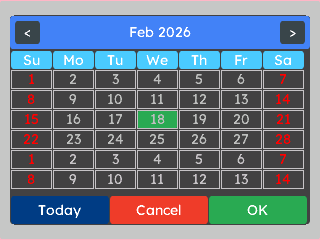
A single month-view calendar centred on a light-grey screen — the quickest way to drop a date selector into a layout.
{
  "elements": [
    {
      "type": "box",
      "name": "Screen",
      "x": 0, "y": 0, "w": 320, "h": 240,
      "color": "0xC6C6C6",
      "children": [
        {
          "type": "calendar",
          "name": "Cal",
          "x": 0, "y": 0, "w": 300, "h": 210,
          "color": "0x404040",
          "align": "MGUI_ALIGN_CENTER",
          "today": { "year": 2025, "month": 4, "day": 15 }
        }
      ]
    }
  ]
}
mgui_widget_t* screen = mgui_allocate_widget(
    NULL, MGUI_WIDGET_BOX,
    (mgui_area_t){0, 0, 320, 240},
    MGUI_COLOR_LIGHT_GRAY);

#ifdef MGUI_WIDGET_ENABLE_CALENDAR
mgui_widget_t* cal = mgui_allocate_widget(
    screen, MGUI_WIDGET_CALENDAR,
    (mgui_area_t){0, 0, 300, 210},
    MGUI_COLOR_DARK_GRAY);
mgui_widget_align(cal, MGUI_ALIGN_CENTER);
mgui_widget_calendar_set_today_date(cal, 2025, 4, 15);
#endif /* MGUI_WIDGET_ENABLE_CALENDAR */
Date Picker (TextEdit + Calendar)
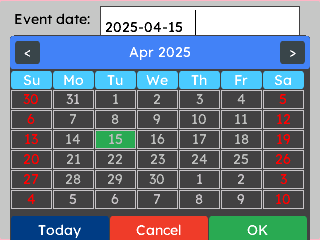
A label and text field sit above the calendar. Tapping the field automatically opens the calendar; selecting a day writes the date back into the field.
{
      "elements": [
    {
      "type": "box",
      "name": "Screen",
      "x": 0, "y": 0, "w": 320, "h": 240,
      "color": "0xC6C6C6",
      "children": [
        {
          "type": "label",
          "name": "Lbl",
          "x": 14, "y": 6, "w": 180, "h": 20,
          "color": "0x10000",
          "text": "Event date:"
        },
        {
          "type": "textedit",
          "name": "DateInput",
          "x": 100, "y": 6, "w": 200, "h": 34,
          "color": "0xFFFFFF",
          "text": "2025-04-15"
        },
        {
          "type": "calendar",
          "name": "Cal",
          "x": 10, "y": 35, "w": 300, "h": 210,
          "color": "0x404040",
          "today": { "year": 2025, "month": 4, "day": 15 }
        }
      ]
    }
  ],
  "connections": [
    { "from": "DateInput", "action": "set_keypad", "to": "Cal" }
  ]
}
mgui_widget_t* screen = mgui_allocate_widget(
    NULL, MGUI_WIDGET_BOX,
    (mgui_area_t){0, 0, 320, 240},
    MGUI_COLOR_LIGHT_GRAY);

mgui_widget_t* lbl = mgui_allocate_widget(
    screen, MGUI_WIDGET_LABEL,
    (mgui_area_t){14, 6, 180, 20},
    MGUI_COLOR_BLACK);
mgui_widget_label_set_text(lbl, "Event date:");

#ifdef MGUI_WIDGET_ENABLE_TEXTEDIT
mgui_widget_t* date_input = mgui_allocate_widget(
    screen, MGUI_WIDGET_TEXTEDIT,
    (mgui_area_t){100, 6, 200, 34},
    MGUI_COLOR_WHITE);
mgui_widget_textedit_set_text(date_input, "2025-04-15");
#endif /* MGUI_WIDGET_ENABLE_TEXTEDIT */

#ifdef MGUI_WIDGET_ENABLE_CALENDAR
mgui_widget_t* cal = mgui_allocate_widget(
    screen, MGUI_WIDGET_CALENDAR,
    (mgui_area_t){10, 35, 300, 210},
    MGUI_COLOR_DARK_GRAY);
mgui_widget_calendar_set_today_date(cal, 2025, 4, 15);
#endif /* MGUI_WIDGET_ENABLE_CALENDAR */

#ifdef MGUI_WIDGET_ENABLE_TEXTEDIT
mgui_widget_textedit_set_keypad(date_input, cal);
#endif /* MGUI_WIDGET_ENABLE_TEXTEDIT */