Label Widget
Overview
The Label widget renders a text string on screen. It supports multiple built-in fonts, a configurable background color, and foreground (text) color. Labels are commonly used to annotate buttons, sliders, charts, and any other widget, or to display dynamic values such as sensor readings.
Enable
No feature flag required — the Label widget is always available.
Individual fonts are enabled via their own flags in mgui_common_defs.h:
#define MGUI_WIDGET_ENABLE_FONT_LEXEND_24PT_2BPP
#define MGUI_WIDGET_ENABLE_FONT_HINDI_14PT_2BPP
// #define MGUI_WIDGET_ENABLE_FONT_ROBOTO_24PT_2BPP
// #define MGUI_WIDGET_ENABLE_FONT_ROBOTO_16PT_4BPP
Creation
mgui_widget_t* label = mgui_allocate_widget(
    parent,
    MGUI_WIDGET_LABEL,
    (mgui_area_t){x, y, width, height},
    MGUI_COLOR_LIGHT_GRAY   // background color — match parent to appear transparent
);
API Reference
Text
// Set displayed text
mgui_widget_label_set_text(label, "Hello, World!");

// Change font
mgui_widget_label_set_font_type(label, MGUI_FONT_LEXEND_24PT_2BPP);
mgui_widget_label_set_font_type(label, MGUI_FONT_HINDI_14PT_2BPP);
mgui_widget_label_set_font_type(label, MGUI_FONT_DEFAULT);
Custom Fonts
Any font generated by the font tool (a mgui_font_t struct in a .h file) can be assigned
directly to a label without adding it to the built-in font list. Each label holds its own
pointer, so multiple labels can use different custom fonts at the same time.
#include "gui/inc/Roboto_Regular_30pt_2bpp.h"
#include "gui/inc/Roboto_Regular_40pt_2bpp.h"

mgui_widget_label_set_custom_font(label, (const mgui_font_t*)&Roboto_Regular_30pt_2bpp);

// To revert to a built-in font:
mgui_widget_label_set_font_type(label, MGUI_FONT_DEFAULT);
Appearance
// Background color (the area behind the rendered glyphs)
mgui_widget_label_set_bg_color(label, MGUI_COLOR_PURPLE);

// Foreground (text) color
mgui_widget_color_change(label, MGUI_COLOR_WHITE);

// Alignment inside the bounding box
mgui_widget_align(label, MGUI_ALIGN_CENTER);

// Hide/show
mgui_widget_set_visible(label, true);
Events
Labels can also receive click events:
static void lbl_click(mgui_widget_t* obj, mgui_event_t event) {
    if (event == MGUI_EVENT_CLICKED) {
        // handle tap on label
    }
}
mgui_widget_click_handler(label, lbl_click);
Font Constants
| Constant | Description |
|---|---|
MGUI_FONT_DEFAULT |
Built-in small pixel font |
MGUI_FONT_LEXEND_24PT_2BPP |
Lexend 24 pt, 2-bit antialiased |
MGUI_FONT_HINDI_14PT_2BPP |
Hindi/Devanagari 14 pt |
MGUI_FONT_ROBOTO_24PT_2BPP |
Roboto 24 pt (requires MGUI_WIDGET_ENABLE_FONT_ROBOTO_24PT_2BPP) |
MGUI_FONT_ROBOTO_16PT_4BPP |
Roboto 16 pt, 4-bit antialiased (requires MGUI_WIDGET_ENABLE_FONT_ROBOTO_16PT_4BPP) |
MGUI_FONT_CUSTOM_PTR |
Set automatically by mgui_widget_label_set_custom_font() — do not set manually |
Examples
Simple Text Label
mgui_widget_t* lbl = mgui_allocate_widget(screen, MGUI_WIDGET_LABEL,
    (mgui_area_t){60, 102, 200, 36}, MGUI_COLOR_PURPLE);
mgui_widget_align(lbl, MGUI_ALIGN_CENTER);
mgui_widget_label_set_text(lbl, "Hello, World!");
mgui_widget_color_change(lbl, MGUI_COLOR_WHITE);
Large Title with Custom Font
mgui_widget_t* title = mgui_allocate_widget(screen, MGUI_WIDGET_LABEL,
    (mgui_area_t){0, 10, 320, 44}, MGUI_COLOR_LIGHT_GRAY);
mgui_widget_label_set_text(title, "mGui Demo");
mgui_widget_label_set_font_type(title, MGUI_FONT_LEXEND_24PT_2BPP);
mgui_widget_color_change(title, MGUI_COLOR_PURPLE);
mgui_widget_align(title, MGUI_ALIGN_TOP_CENTER);
Status Badges
mgui_widget_t* err_lbl = mgui_allocate_widget(screen, MGUI_WIDGET_LABEL,
    (mgui_area_t){60, 95, 80, 30}, MGUI_COLOR_CRIMSON);
mgui_widget_align(err_lbl, MGUI_ALIGN_CENTER);
mgui_widget_label_set_text(err_lbl, "ERROR");
mgui_widget_color_change(err_lbl, MGUI_COLOR_WHITE);

mgui_widget_t* ok_lbl = mgui_allocate_widget(screen, MGUI_WIDGET_LABEL,
    (mgui_area_t){180, 95, 80, 30}, MGUI_COLOR_EMERALD);
mgui_widget_align(ok_lbl, MGUI_ALIGN_CENTER);
mgui_widget_label_set_text(ok_lbl, "OK");
mgui_widget_color_change(ok_lbl, MGUI_COLOR_WHITE);
Dynamic Update (sensor read)
// In your periodic timer / task:
char buf[32];
snprintf(buf, sizeof(buf), "Temp: %d °C", sensor_value);
mgui_widget_label_set_text(app.value_label, buf);
Common Combinations
| Use Case | Widget pairing |
|---|---|
| Slider value readout | Label above/below a Slider |
| Chart title | Label above a Bar/Pie chart |
| Status badge | Small label with MGUI_COLOR_CRIMSON or MGUI_COLOR_EMERALD background |
| Form field name | Label to the left of a TextEdit |
| Unit annotation | Small label next to an Arc progress ring |
Examples
Simple Label
A centered purple label on a light-gray screen — the minimal starting point.
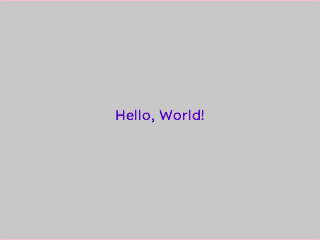
mgui_widget_t* screen = mgui_allocate_widget(
    NULL, MGUI_WIDGET_BOX,
    (mgui_area_t){0, 0, 320, 240},
    MGUI_COLOR_LIGHT_GRAY);

mgui_widget_t* lbl = mgui_allocate_widget(
    screen, MGUI_WIDGET_LABEL,
    (mgui_area_t){0, 0, 200, 36},
    MGUI_COLOR_PURPLE);
mgui_widget_align(lbl, MGUI_ALIGN_CENTER);
mgui_widget_label_set_text(lbl, "Hello, World!");
mgui_widget_color_change(lbl, MGUI_COLOR_WHITE);
Title Label with Large Font
Full-width title bar using MGUI_FONT_LEXEND_24PT_2BPP — ideal for screen headers.
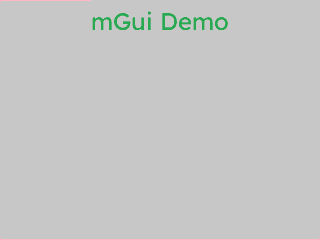
{
  "elements": [
    {
      "type": "box",
      "name": "Screen",
      "x": 0, "y": 0, "w": 320, "h": 240,
      "color": "0xC6C6C6",
      "children": [
        {
          "type": "label",
          "name": "TitleLabel",
          "x": 0, "y": 10, "w": 320, "h": 44,
          "color": "0x2DA852",
          "align": "MGUI_ALIGN_TOP_CENTER",
          "text": "mGui Demo",
          "font": "MGUI_FONT_LEXEND_24PT_2BPP"
        }
      ]
    }
  ]
}
mgui_widget_t* title = mgui_allocate_widget(
    screen, MGUI_WIDGET_LABEL,
    (mgui_area_t){0, 10, 320, 44},
    MGUI_COLOR_LIGHT_GRAY);
mgui_widget_align(title, MGUI_ALIGN_TOP_CENTER);
mgui_widget_label_set_text(title, "mGui Demo");
mgui_widget_label_set_font_type(title, MGUI_FONT_LEXEND_24PT_2BPP);
mgui_widget_color_change(title, MGUI_COLOR_PURPLE);
Custom Font Labels
Two labels rendered with different user-supplied fonts — no feature flags or built-in font registration required. Simply include the generated header and pass a pointer.
#include "mgui/inc/Roboto_Regular_30pt_2bpp.h"
#include "mgui/inc/Roboto_Regular_40pt_2bpp.h"

// 30 pt label
mgui_widget_t* label1 = mgui_allocate_widget(
    app.screen, MGUI_WIDGET_LABEL,
    (mgui_area_t){300, 300, 400, 50},
    MGUI_COLOR_BLACK);
mgui_widget_label_set_text(label1, "3.14");
mgui_widget_label_set_custom_font(label1, (const mgui_font_t*)&Roboto_Regular_30pt_2bpp);

// 40 pt label — completely independent
mgui_widget_t* label2 = mgui_allocate_widget(
    app.screen, MGUI_WIDGET_LABEL,
    (mgui_area_t){300, 400, 400, 50},
    MGUI_COLOR_BLACK);
mgui_widget_label_set_text(label2, "Hello 40pt");
mgui_widget_label_set_custom_font(label2, (const mgui_font_t*)&Roboto_Regular_40pt_2bpp);
Tip
There is no limit on how many different custom fonts are active at once — each label stores
its own const mgui_font_t* pointer independently.
Status Badges
Pair of color-coded status labels — crimson for errors, emerald for success.
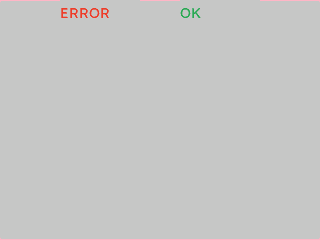
{
  "elements": [
    {
      "type": "box",
      "name": "Screen",
      "x": 0, "y": 0, "w": 320, "h": 240,
      "color": "0xC6C6C6",
      "children": [
        {
          "type": "label",
          "name": "ErrLabel",
          "x": 60, "y": 0, "w": 80, "h": 30,
          "color": "0xEF3F2E",
          "text": "ERROR"
        },
        {
          "type": "label",
          "name": "OkLabel",
          "x": 180, "y": 0, "w": 80, "h": 30,
          "color": "0x2DA852",
          "text": "OK"
        }
      ]
    }
  ]
}
mgui_widget_t* err_lbl = mgui_allocate_widget(
    screen, MGUI_WIDGET_LABEL,
    (mgui_area_t){60, 95, 80, 30},
    MGUI_COLOR_CRIMSON);
mgui_widget_label_set_text(err_lbl, "ERROR");
mgui_widget_color_change(err_lbl, MGUI_COLOR_WHITE);

mgui_widget_t* ok_lbl = mgui_allocate_widget(
    screen, MGUI_WIDGET_LABEL,
    (mgui_area_t){180, 95, 80, 30},
    MGUI_COLOR_EMERALD);
mgui_widget_label_set_text(ok_lbl, "OK");
mgui_widget_color_change(ok_lbl, MGUI_COLOR_WHITE);