Keyboard Widgets
Overview
mGui provides two keyboard widgets for text input, designed to work as pop-up keypads linked to a TextEdit widget:
- Numeric Keypad (
MGUI_WIDGET_NUMKEYPAD) — digits 0–9, decimal point, backspace, confirm - Alphanumeric Keyboard (
MGUI_WIDGET_ALPHANUM_KEYBOARD) — full QWERTY-style soft keyboard
Both keyboards appear when the user taps the linked TextEdit and hide when input is confirmed.
Numeric Keypad
Enable
Creation
mgui_widget_t* numpad = mgui_allocate_widget(
    screen,
    MGUI_WIDGET_NUMKEYPAD,
    (mgui_area_t){x, y, width, height},
    MGUI_COLOR_PURPLE
);
API Reference
// Pre-load an initial value string
mgui_widget_numkeypad_load_value(numpad, "42");

// Read the entered value string
const char* val = mgui_widget_numkeypad_get_value(numpad);

// Bind to a TextEdit — keypad appears when that TextEdit is tapped
mgui_widget_textedit_set_keypad(my_textedit, numpad);
Alphanumeric Keyboard
Enable
Creation
mgui_widget_t* alphakb = mgui_allocate_widget(
    screen,
    MGUI_WIDGET_ALPHANUM_KEYBOARD,
    (mgui_area_t){x, y, width, height},
    MGUI_COLOR_EMERALD
);
API Reference
// Pre-load text into the keyboard buffer
mgui_widget_alphanum_keyboard_load_value(alphakb, "Hello");

// Bind to a TextEdit
mgui_widget_textedit_set_keypad(my_textedit, alphakb);
Multiple Inputs, One Keyboard
A single keyboard instance can be shared across several TextEdit widgets. Whichever field the user taps last owns the input focus:
mgui_widget_t* first_name = mgui_allocate_widget(screen, MGUI_WIDGET_TEXTEDIT,
    (mgui_area_t){60, 40, 200, 38}, MGUI_COLOR_WHITE);
mgui_widget_t* last_name  = mgui_allocate_widget(screen, MGUI_WIDGET_TEXTEDIT,
    (mgui_area_t){60, 90, 200, 38}, MGUI_COLOR_WHITE);

mgui_widget_t* shared_kb = mgui_allocate_widget(screen, MGUI_WIDGET_ALPHANUM_KEYBOARD,
    (mgui_area_t){0, 140, 320, 100}, MGUI_COLOR_EMERALD);

mgui_widget_textedit_set_keypad(first_name, shared_kb);
mgui_widget_textedit_set_keypad(last_name,  shared_kb);
Common Combinations
| Input type | Keyboard |
|---|---|
| Numeric settings | MGUI_WIDGET_NUMKEYPAD |
| Wi-Fi SSID / password | MGUI_WIDGET_ALPHANUM_KEYBOARD |
| Device name | MGUI_WIDGET_ALPHANUM_KEYBOARD |
| IP address | MGUI_WIDGET_NUMKEYPAD |
| Date entry | MGUI_WIDGET_CALENDAR (see Calendar docs) |
Examples
Numeric Keypad — Speed Entry
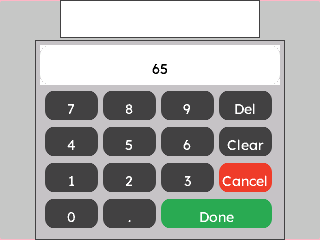
A purple numeric keypad linked to a TextEdit field on a light gray screen. Tap the field to open the keypad; confirm to write the value back.
{
  "elements": [
    {
      "type": "box",
      "name": "Screen",
      "x": 0, "y": 0, "w": 320, "h": 240,
      "color": "0xC6C6C6",
      "children": [
        {
          "type": "textedit",
          "name": "SpeedInput",
          "x": 60, "y": 0, "w": 200, "h": 38,
          "color": "0xFFFFFF",
          "placeholder": "Enter speed..."
        },
        {
          "type": "numkeypad",
          "name": "SpeedPad",
          "x": 35, "y": 40, "w": 250, "h": 200,
          "color": "0x5900CC",
          "initial_value": "0"
        }
      ]
    }
  ],
  "connections": [
    { "from": "SpeedInput", "to": "SpeedPad", "action": "set_keypad" }
  ]
}
mgui_widget_t* screen = mgui_allocate_widget(
    NULL, MGUI_WIDGET_BOX,
    (mgui_area_t){0, 0, 320, 240},
    MGUI_COLOR_LIGHT_GRAY);

#ifdef MGUI_WIDGET_ENABLE_TEXTEDIT
/* SpeedInput */
mgui_widget_t* speed_input = mgui_allocate_widget(
    screen, MGUI_WIDGET_TEXTEDIT,
    (mgui_area_t){60, 20, 200, 38},
    MGUI_COLOR_WHITE);
mgui_widget_textedit_set_placeholder(speed_input, "Enter speed...");

/* SpeedPad */
#ifdef MGUI_WIDGET_ENABLE_NUM_KEYPAD
mgui_widget_t* speed_pad = mgui_allocate_widget(
    screen, MGUI_WIDGET_NUMKEYPAD,
    (mgui_area_t){35, 68, 250, 162},
    MGUI_COLOR_PURPLE);
mgui_widget_numkeypad_load_value(speed_pad, "0");

mgui_widget_textedit_set_keypad(speed_input, speed_pad);
#endif /* MGUI_WIDGET_ENABLE_NUM_KEYPAD */
#endif /* MGUI_WIDGET_ENABLE_TEXTEDIT */
Alphanumeric Keyboard — Wi-Fi SSID Entry
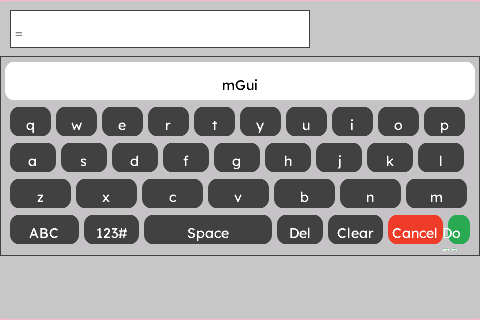
A full green QWERTY keyboard anchored to the bottom of the screen, linked to a TextEdit for Wi-Fi network name input.
{
  "elements": [
    {
      "type": "box",
      "name": "Screen",
      "x": 0, "y": 0, "w": 480, "h": 320,
      "color": "0xC6C6C6",
      "children": [
        {
          "type": "textedit",
          "name": "SsidInput",
          "x": 10, "y": 10, "w": 300, "h": 38,
          "color": "0xFFFFFF",
          "placeholder": "Wi-Fi SSID"
        },
        {
          "type": "alphanum_keyboard",
          "name": "AlphaKb",
          "x": 0, "y": 56, "w": 480, "h": 200,
          "color": "0x2DA852"
        }
      ]
    }
  ],
  "connections": [
    { "from": "SsidInput", "to": "AlphaKb", "action": "set_keypad" }
  ]
}
mgui_widget_t* screen = mgui_allocate_widget(
    NULL, MGUI_WIDGET_BOX,
    (mgui_area_t){0, 0, 480, 320},
    MGUI_COLOR_LIGHT_GRAY);

#ifdef MGUI_WIDGET_ENABLE_TEXTEDIT
/* SsidInput */
mgui_widget_t* ssid_input = mgui_allocate_widget(
    screen, MGUI_WIDGET_TEXTEDIT,
    (mgui_area_t){10, 10, 300, 38},
    MGUI_COLOR_WHITE);
mgui_widget_textedit_set_placeholder(ssid_input, "Wi-Fi SSID");

/* AlphaKb */
#ifdef MGUI_WIDGET_ENABLE_ALPHANUM_KEYBOARD
mgui_widget_t* alpha_kb = mgui_allocate_widget(
    screen, MGUI_WIDGET_ALPHANUM_KEYBOARD,
    (mgui_area_t){0, 56, 480, 200},
    MGUI_COLOR_EMERALD);

mgui_widget_textedit_set_keypad(ssid_input, alpha_kb);
#endif /* MGUI_WIDGET_ENABLE_ALPHANUM_KEYBOARD */
#endif /* MGUI_WIDGET_ENABLE_TEXTEDIT */