TextEdit Widget
Overview
The TextEdit widget is a tappable text input field. When the user taps it, a linked keyboard widget appears for input. Text can be pre-filled, read back, or cleared programmatically.
Enable
Also enable the keyboard you intend to link:
#define MGUI_WIDGET_ENABLE_NUM_KEYPAD         // numeric input
#define MGUI_WIDGET_ENABLE_ALPHANUM_KEYBOARD  // full alphanumeric input
Creation
#ifdef MGUI_WIDGET_ENABLE_TEXTEDIT
mgui_widget_t* te = mgui_allocate_widget(
    parent,
    MGUI_WIDGET_TEXTEDIT,
    (mgui_area_t){x, y, width, height},
    MGUI_COLOR_ELEM_DARK_SLATE
);
#endif
API Reference
Text
mgui_widget_textedit_set_text(te, "default");
mgui_widget_textedit_set_placeholder(te, "Enter value…");
const char* s = mgui_widget_textedit_get_text(te);

mgui_widget_textedit_append_char(te, 'A');
mgui_widget_textedit_delete_char(te);
mgui_widget_textedit_clear(te);
mgui_widget_textedit_apply_value(te, "new_val");
Keyboard Binding
Bind via set_keypad connection in JSON, or directly in C:
Common Combinations
| Use Case | Keyboard type |
|---|---|
| Numeric settings (speed, temp) | MGUI_WIDGET_NUMKEYPAD |
| Name / SSID / password | MGUI_WIDGET_ALPHANUM_KEYBOARD |
| Date entry | MGUI_WIDGET_CALENDAR |
Examples
Numeric Field + Numpad
A value input field with a placeholder and a numpad that auto-shows on tap — covers text, placeholder, set_keypad connection, and reading the value back.
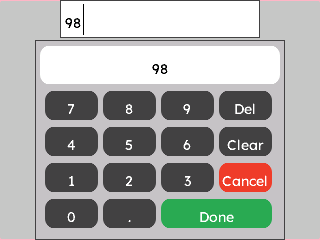
{
  "elements": [
    {
      "type": "box",
      "name": "Screen",
      "x": 0, "y": 0, "w": 320, "h": 240,
      "color": "0xC6C6C6",
      "children": [
        {
          "type": "textedit",
          "name": "SpeedField",
          "x": 60, "y": 0, "w": 200, "h": 38,
          "color": "0xFFFFFF",
          "placeholder": "Enter speed (rpm)..."
        },
        {
          "type": "numkeypad",
          "name": "NumPad",
          "x": 35, "y": 40, "w": 250, "h": 200,
          "color": "0x5900CC",
          "initial_value": "1200"
        }
      ]
    }
  ],
  "connections": [
    { "from": "SpeedField", "to": "NumPad", "action": "set_keypad" }
  ]
}
mgui_widget_t* screen = mgui_allocate_widget(
    NULL, MGUI_WIDGET_BOX,
    (mgui_area_t){0, 0, 320, 240},
    MGUI_COLOR_LIGHT_GRAY);

#ifdef MGUI_WIDGET_ENABLE_TEXTEDIT
mgui_widget_t* speed_field = mgui_allocate_widget(
    screen, MGUI_WIDGET_TEXTEDIT,
    (mgui_area_t){60, 20, 200, 38},
    MGUI_COLOR_WHITE);
mgui_widget_textedit_set_placeholder(speed_field, "Enter speed (rpm)...");

#ifdef MGUI_WIDGET_ENABLE_NUM_KEYPAD
mgui_widget_t* numpad = mgui_allocate_widget(
    screen, MGUI_WIDGET_NUMKEYPAD,
    (mgui_area_t){35, 68, 250, 162},
    MGUI_COLOR_PURPLE);
mgui_widget_numkeypad_load_value(numpad, "1200");

mgui_widget_textedit_set_keypad(speed_field, numpad);
#endif /* MGUI_WIDGET_ENABLE_NUM_KEYPAD */
#endif /* MGUI_WIDGET_ENABLE_TEXTEDIT */

// Read back on submit:
// int rpm = atoi(mgui_widget_textedit_get_text(speed_field));