Progress Bar Widget
Overview
The Progress Bar widget visualizes a numeric value as a filled bar, optionally showing the percentage text. It supports horizontal and vertical orientations, custom fill color, and font selection.
Enable
Creation
#ifdef MGUI_WIDGET_ENABLE_PROGRESS_BAR
mgui_widget_t* pb = mgui_allocate_widget(
    parent,
    MGUI_WIDGET_PROGRESS_BAR,
    (mgui_area_t){x, y, width, height},
    MGUI_COLOR_ELEM_DARK_SLATE   // background color
);
#endif
API Reference
Value & Range
Orientation
mgui_widget_progress_bar_set_orientation(pb, MGUI_PROGRESS_BAR_HORIZONTAL);
mgui_widget_progress_bar_set_orientation(pb, MGUI_PROGRESS_BAR_VERTICAL);
Appearance
// Bar fill color
mgui_widget_progress_bar_set_bar_color(pb, MGUI_COLOR_EMERALD);

// Show "75%" text overlay
mgui_widget_progress_bar_show_percentage(pb, true);

// Percentage text on the bar (true) or outside (false)
mgui_widget_progress_bar_set_text_on_bar(pb, true);

// Font for percentage text
mgui_widget_progress_bar_set_font(pb, MGUI_FONT_DEFAULT);

// Border
mgui_widget_border_property(pb, MGUI_COLOR_PURPLE, 1);
Common Combinations
| Use Case | Setup |
|---|---|
| Download / flash progress | Horizontal bar, show_percentage = true, text_on_bar = true |
| Battery indicator | Vertical bar, no percentage text |
| Sensor level meter | Vertical bar updated from a timer |
| Volume bar | Horizontal bar mirroring a Slider value |
Examples
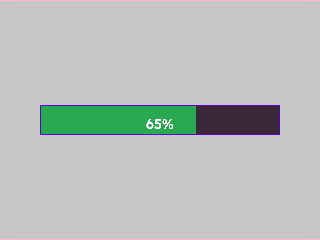
Horizontal Progress Bar with Percentage
A centered emerald bar on a light-gray screen — covers range, value, fill color, percentage overlay, and border.
{
  "elements": [
    {
      "type": "box",
      "name": "Screen",
      "x": 0, "y": 0, "w": 320, "h": 240,
      "color": "0xC6C6C6",
      "children": [
        {
          "type": "progress_bar",
          "name": "DownloadBar",
          "x": 0, "y": 0, "w": 240, "h": 30,
          "color": "0x3A2939",
          "align": "MGUI_ALIGN_CENTER",
          "range": { "min": 0, "max": 100 },
          "value": 65,
          "orientation": "horizontal",
          "bar_color": "0x2DA852",
          "show_percentage": true,
          "text_on_bar": true,
          "border": { "color": "0x5900CC", "width": 1 }
        }
      ]
    }
  ]
}
mgui_widget_t* screen = mgui_allocate_widget(
    NULL, MGUI_WIDGET_BOX,
    (mgui_area_t){0, 0, 320, 240},
    MGUI_COLOR_LIGHT_GRAY);

#ifdef MGUI_WIDGET_ENABLE_PROGRESS_BAR
mgui_widget_t* pb = mgui_allocate_widget(
    screen, MGUI_WIDGET_PROGRESS_BAR,
    (mgui_area_t){0, 0, 240, 30},
    MGUI_COLOR_ELEM_DARK_SLATE);
mgui_widget_align(pb, MGUI_ALIGN_CENTER);
mgui_widget_progress_bar_set_range(pb, 0, 100);
mgui_widget_progress_bar_set_value(pb, 65);
mgui_widget_progress_bar_set_orientation(pb, MGUI_PROGRESS_BAR_HORIZONTAL);
mgui_widget_progress_bar_set_bar_color(pb, MGUI_COLOR_EMERALD);
mgui_widget_progress_bar_show_percentage(pb, true);
mgui_widget_progress_bar_set_text_on_bar(pb, true);
mgui_widget_border_property(pb, MGUI_COLOR_PURPLE, 1);

// Update from task / timer:
// mgui_widget_progress_bar_set_value(pb, bytes_done * 100 / total_bytes);
#endif /* MGUI_WIDGET_ENABLE_PROGRESS_BAR */
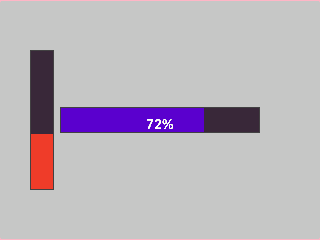
Vertical + Horizontal Bars Side by Side
Two bars on one screen — vertical battery indicator (no text) and horizontal CPU load (with percentage) — covers both orientations and different fill colors.
{
  "elements": [
    {
      "type": "box",
      "name": "Screen",
      "x": 0, "y": 0, "w": 320, "h": 240,
      "color": "0xC6C6C6",
      "children": [
        {
          "type": "progress_bar",
          "name": "BatteryBar",
          "x": 30, "y": 50, "w": 24, "h": 140,
          "color": "0x3A2939",
          "orientation": "vertical",
          "range": { "min": 0, "max": 100 },
          "value": 40,
          "bar_color": "0xEF3F2E",
          "show_percentage": false
        },
        {
          "type": "progress_bar",
          "name": "CpuBar",
          "x": 0, "y": 0, "w": 200, "h": 26,
          "color": "0x3A2939",
          "align": "MGUI_ALIGN_CENTER",
          "orientation": "horizontal",
          "range": { "min": 0, "max": 100 },
          "value": 72,
          "bar_color": "0x5900CC",
          "show_percentage": true,
          "text_on_bar": true
        }
      ]
    }
  ]
}
#ifdef MGUI_WIDGET_ENABLE_PROGRESS_BAR
mgui_widget_t* bat_pb = mgui_allocate_widget(
    screen, MGUI_WIDGET_PROGRESS_BAR,
    (mgui_area_t){30, 50, 24, 140},
    MGUI_COLOR_ELEM_DARK_SLATE);
mgui_widget_progress_bar_set_orientation(bat_pb, MGUI_PROGRESS_BAR_VERTICAL);
mgui_widget_progress_bar_set_range(bat_pb, 0, 100);
mgui_widget_progress_bar_set_value(bat_pb, 40);
mgui_widget_progress_bar_set_bar_color(bat_pb, MGUI_COLOR_CRIMSON);
mgui_widget_progress_bar_show_percentage(bat_pb, false);

mgui_widget_t* cpu_pb = mgui_allocate_widget(
    screen, MGUI_WIDGET_PROGRESS_BAR,
    (mgui_area_t){0, 0, 200, 26},
    MGUI_COLOR_ELEM_DARK_SLATE);
mgui_widget_align(cpu_pb, MGUI_ALIGN_CENTER);
mgui_widget_progress_bar_set_orientation(cpu_pb, MGUI_PROGRESS_BAR_HORIZONTAL);
mgui_widget_progress_bar_set_range(cpu_pb, 0, 100);
mgui_widget_progress_bar_set_value(cpu_pb, 72);
mgui_widget_progress_bar_set_bar_color(cpu_pb, MGUI_COLOR_PURPLE);
mgui_widget_progress_bar_show_percentage(cpu_pb, true);
mgui_widget_progress_bar_set_text_on_bar(cpu_pb, true);
#endif /* MGUI_WIDGET_ENABLE_PROGRESS_BAR */