Radio Button Widget
Overview
The Radio Button widget provides mutually exclusive selection within a group. Only one radio button per group can be checked at a time — selecting one automatically deselects the others.
Enable
No feature flag required — the Radio Button widget is always available.
Creation
Create a group first, then assign each button to it.
// 1. Create the group
mgui_radio_group_t* rg = mgui_widget_radio_group_create();

// 2. Create each button and assign to the group
mgui_widget_t* rb = mgui_allocate_widget(
    parent,
    MGUI_WIDGET_RADIO_BUTTON,
    (mgui_area_t){x, y, width, height},
    MGUI_COLOR_LIGHT_GRAY
);
mgui_widget_radio_button_set_group(rb, rg);
mgui_widget_radio_button_set_text(rb, "Option A");
mgui_widget_radio_button_set_text_color(rb, MGUI_COLOR_PURPLE);
API Reference
// Create a mutual-exclusion group
mgui_radio_group_t* rg = mgui_widget_radio_group_create();

// Assign button to group
mgui_widget_radio_button_set_group(rb, rg);

// Set label text
mgui_widget_radio_button_set_text(rb, "Option A");

// Set label text color
mgui_widget_radio_button_set_text_color(rb, MGUI_COLOR_PURPLE);

// Pre-select a button programmatically
mgui_widget_radio_button_set_checked(rb, true);
Events
static void on_radio(mgui_widget_t* obj, mgui_event_t event) {
    if (event == MGUI_EVENT_CLICKED) {
        // this button is now selected
    }
}
mgui_widget_click_handler(rb, on_radio);
Common Combinations
| Use Case | Setup |
|---|---|
| Speed / quality level | 3–5 buttons in one group |
| Mode selection | Radio group controlling app behavior |
| Multiple independent groups | Each dimension gets its own mgui_radio_group_t |
Examples
Single Group (Speed Selection)
Three radio buttons sharing one group — covers group creation, default selection, text color, and click callback.

{
  "elements": [
    {
      "type": "box",
      "name": "Screen",
      "x": 0, "y": 0, "w": 320, "h": 240,
      "color": "0xC6C6C6",
      "children": [
        {
          "type": "radio",
          "name": "RbLow",
          "x": 60, "y": 70, "w": 180, "h": 30,
          "color": "0x5900CC",
          "group": "SpeedGroup",
          "rb_text": "Low Speed",
          "rb_text_color": "0x5900CC",
          "rb_checked": true
        },
        {
          "type": "radio",
          "name": "RbMed",
          "x": 60, "y": 110, "w": 180, "h": 30,
          "color": "0x5900CC",
          "group": "SpeedGroup",
          "rb_text": "Medium Speed",
          "rb_text_color": "0x5900CC"
        },
        {
          "type": "radio",
          "name": "RbHigh",
          "x": 60, "y": 150, "w": 180, "h": 30,
          "color": "0x5900CC",
          "group": "SpeedGroup",
          "rb_text": "High Speed",
          "rb_text_color": "0x5900CC"
        }
      ]
    }
  ]
}
mgui_widget_t* screen = mgui_allocate_widget(
    NULL, MGUI_WIDGET_BOX,
    (mgui_area_t){0, 0, 320, 240},
    MGUI_COLOR_LIGHT_GRAY);

mgui_radio_group_t* grp_speed_group = mgui_widget_radio_group_create();

mgui_widget_t* rb_low = mgui_allocate_widget(
    screen, MGUI_WIDGET_RADIO_BUTTON,
    (mgui_area_t){60, 70, 180, 30},
    MGUI_COLOR_PURPLE);
mgui_widget_radio_button_set_group(rb_low, grp_speed_group);
mgui_widget_radio_button_set_text(rb_low, "Low Speed");
mgui_widget_radio_button_set_text_color(rb_low, MGUI_COLOR_PURPLE);
mgui_widget_radio_button_set_checked(rb_low, true);

mgui_widget_t* rb_med = mgui_allocate_widget(
    screen, MGUI_WIDGET_RADIO_BUTTON,
    (mgui_area_t){60, 110, 180, 30},
    MGUI_COLOR_PURPLE);
mgui_widget_radio_button_set_group(rb_med, grp_speed_group);
mgui_widget_radio_button_set_text(rb_med, "Medium Speed");
mgui_widget_radio_button_set_text_color(rb_med, MGUI_COLOR_PURPLE);

mgui_widget_t* rb_high = mgui_allocate_widget(
    screen, MGUI_WIDGET_RADIO_BUTTON,
    (mgui_area_t){60, 150, 180, 30},
    MGUI_COLOR_PURPLE);
mgui_widget_radio_button_set_group(rb_high, grp_speed_group);
mgui_widget_radio_button_set_text(rb_high, "High Speed");
mgui_widget_radio_button_set_text_color(rb_high, MGUI_COLOR_PURPLE);

static void on_speed(mgui_widget_t* obj, mgui_event_t event) {
    if (event == MGUI_EVENT_CLICKED) {
        // obj == whichever button was selected
    }
}
mgui_widget_click_handler(rb_low,  on_speed);
mgui_widget_click_handler(rb_med,  on_speed);
mgui_widget_click_handler(rb_high, on_speed);
Two Independent Groups
Two separate groups on one screen — covers how multiple mgui_radio_group_t instances work independently.
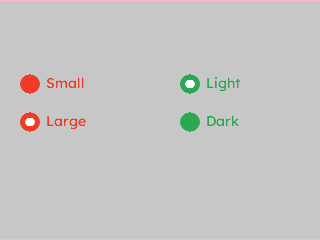
{
  "elements": [
    {
      "type": "box",
      "name": "Screen",
      "x": 0, "y": 0, "w": 320, "h": 240,
      "color": "0xC6C6C6",
      "children": [
        {
          "type": "radio",
          "name": "RbSmall",
          "x": 20, "y": 70, "w": 120, "h": 28,
          "color": "0xEF3F2E",
          "group": "SizeGroup",
          "rb_text": "Small",
          "rb_text_color": "0xEF3F2E",
          "rb_checked": true
        },
        {
          "type": "radio",
          "name": "RbLarge",
          "x": 20, "y": 108, "w": 120, "h": 28,
          "color": "0xEF3F2E",
          "group": "SizeGroup",
          "rb_text": "Large",
          "rb_text_color": "0xEF3F2E"
        },
        {
          "type": "radio",
          "name": "RbLight",
          "x": 180, "y": 70, "w": 120, "h": 28,
          "color": "0x2DA852",
          "group": "ThemeGroup",
          "rb_text": "Light",
          "rb_text_color": "0x2DA852",
          "rb_checked": true
        },
        {
          "type": "radio",
          "name": "RbDark",
          "x": 180, "y": 108, "w": 120, "h": 28,
          "color": "0x2DA852",
          "group": "ThemeGroup",
          "rb_text": "Dark",
          "rb_text_color": "0x2DA852"
        }
      ]
    }
  ]
}
mgui_radio_group_t* grp_size_group  = mgui_widget_radio_group_create();
mgui_radio_group_t* grp_theme_group = mgui_widget_radio_group_create();

mgui_widget_t* rb_small = mgui_allocate_widget(
    screen, MGUI_WIDGET_RADIO_BUTTON,
    (mgui_area_t){20, 70, 120, 28},
    MGUI_COLOR_CRIMSON);
mgui_widget_radio_button_set_group(rb_small, grp_size_group);
mgui_widget_radio_button_set_text(rb_small, "Small");
mgui_widget_radio_button_set_text_color(rb_small, MGUI_COLOR_CRIMSON);
mgui_widget_radio_button_set_checked(rb_small, true);

mgui_widget_t* rb_large = mgui_allocate_widget(
    screen, MGUI_WIDGET_RADIO_BUTTON,
    (mgui_area_t){20, 108, 120, 28},
    MGUI_COLOR_CRIMSON);
mgui_widget_radio_button_set_group(rb_large, grp_size_group);
mgui_widget_radio_button_set_text(rb_large, "Large");
mgui_widget_radio_button_set_text_color(rb_large, MGUI_COLOR_CRIMSON);

mgui_widget_t* rb_light = mgui_allocate_widget(
    screen, MGUI_WIDGET_RADIO_BUTTON,
    (mgui_area_t){180, 70, 120, 28},
    MGUI_COLOR_EMERALD);
mgui_widget_radio_button_set_group(rb_light, grp_theme_group);
mgui_widget_radio_button_set_text(rb_light, "Light");
mgui_widget_radio_button_set_text_color(rb_light, MGUI_COLOR_EMERALD);
mgui_widget_radio_button_set_checked(rb_light, true);

mgui_widget_t* rb_dark = mgui_allocate_widget(
    screen, MGUI_WIDGET_RADIO_BUTTON,
    (mgui_area_t){180, 108, 120, 28},
    MGUI_COLOR_EMERALD);
mgui_widget_radio_button_set_group(rb_dark, grp_theme_group);
mgui_widget_radio_button_set_text(rb_dark, "Dark");
mgui_widget_radio_button_set_text_color(rb_dark, MGUI_COLOR_EMERALD);