Dropdown Widget
Overview
The Dropdown widget shows a collapsed selection box that expands downward to reveal a scrollable list of options. It is ideal for selecting one item from a longer list without consuming permanent screen space.
Enable
Creation
mgui_widget_t* dd = mgui_allocate_widget(
    parent,
    MGUI_WIDGET_DROPDOWN,
    (mgui_area_t){x, y, width, height},
    MGUI_COLOR_PURPLE
);
API Reference
Items
static const char* items[] = {"Option A", "Option B", "Option C", "Option D"};

// Assign item list (pointer array + count)
mgui_widget_dropdown_set_items(dd, items, 4);

// Programmatically set selected index
mgui_widget_dropdown_set_selected(dd, 0);

// Read selected index
int16_t idx = mgui_widget_dropdown_get_selected(dd);

// Read selected text
const char* txt = mgui_widget_dropdown_get_selected_text(dd);
Appearance
mgui_widget_color_change(dd, MGUI_COLOR_PURPLE);
mgui_widget_border_property(dd, MGUI_COLOR_WHITE, 1);
mgui_widget_radius_property(dd, 6, true);

// Font for items
mgui_widget_dropdown_set_font(dd, MGUI_FONT_DEFAULT);

// Height of each item row
mgui_widget_dropdown_set_item_height(dd, 36);

// Max visible rows before scrolling
mgui_widget_dropdown_set_max_visible_items(dd, 4);
Events
static void dd_changed(mgui_widget_t* obj, mgui_event_t event) {
    if (event & MGUI_EVENT_CHANGE) {
        int16_t sel = mgui_widget_dropdown_get_selected(obj);
        const char* txt = mgui_widget_dropdown_get_selected_text(obj);
        // act on selection
    }
}
mgui_widget_click_handler(dd, dd_changed);
Event Constants
| Event | Description |
|---|---|
MGUI_EVENT_CHANGE |
User selected a different item |
MGUI_EVENT_CLICKED |
Dropdown header tapped (open/close) |
Examples
Basic Dropdown
A centered dropdown on a light-gray screen — the minimal starting point.
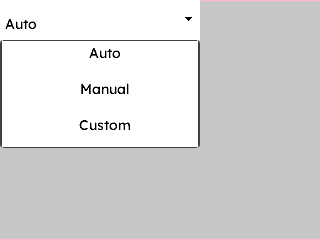
{
  "elements": [
    {
      "type": "box",
      "name": "Screen",
      "x": 0, "y": 0, "w": 320, "h": 240,
      "color": "0xC6C6C6",
      "children": [
        {
          "type": "dropdown",
          "name": "ModeDD",
          "x": 0, "y": 0, "w": 200, "h": 40,
          "color": "0xFFFFFF",
          "align": "MGUI_ALIGN_CENTER",
          "corner": { "radius": 6, "filled": true },
          "border": { "color": "0xFFFFFF", "width": 1 },
          "items": ["Auto", "Manual", "Custom"],
          "selected": 0,
          "item_height": 36
        }
      ]
    }
  ]
}
mgui_widget_t* screen = mgui_allocate_widget(
    NULL, MGUI_WIDGET_BOX,
    (mgui_area_t){0, 0, 320, 240},
    MGUI_COLOR_LIGHT_GRAY);

static const char* modes[] = {"Auto", "Manual", "Custom"};

mgui_widget_t* dd = mgui_allocate_widget(
    screen, MGUI_WIDGET_DROPDOWN,
    (mgui_area_t){0, 0, 200, 40},
    MGUI_COLOR_PURPLE);
mgui_widget_align(dd, MGUI_ALIGN_CENTER);
mgui_widget_radius_property(dd, 6, true);
mgui_widget_border_property(dd, MGUI_COLOR_WHITE, 1);
mgui_widget_dropdown_set_items(dd, modes, 3);
mgui_widget_dropdown_set_selected(dd, 0);
mgui_widget_dropdown_set_item_height(dd, 36);
Dropdown with Label and Change Event
A labelled selector — fires a callback whenever the user picks a different option.
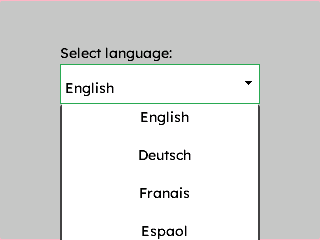
{
  "elements": [
    {
      "type": "box",
      "name": "Screen",
      "x": 0, "y": 0, "w": 320, "h": 240,
      "color": "0xC6C6C6",
      "children": [
        {
          "type": "label",
          "name": "DDLabel",
          "x": 60, "y": 40, "w": 200, "h": 26,
          "color": "0x000000",
          "text": "Select language:"
        },
        {
          "type": "dropdown",
          "name": "LangDD",
          "x": 60, "y": 64, "w": 200, "h": 40,
          "color": "0xFFFFFF",
          "corner": { "radius": 6, "filled": true },
          "border": { "color": "0x2DA852", "width": 1 },
          "items": ["English", "Deutsch", "Français", "Español"],
          "selected": 0,
          "item_height": 38,
          "max_visible": 4
        }
      ]
    }
  ]
}
mgui_widget_t* screen = mgui_allocate_widget(
    NULL, MGUI_WIDGET_BOX,
    (mgui_area_t){0, 0, 320, 240},
    MGUI_COLOR_LIGHT_GRAY);

mgui_widget_t* lbl = mgui_allocate_widget(
    screen, MGUI_WIDGET_LABEL,
    (mgui_area_t){60, 80, 200, 26},
    MGUI_COLOR_LIGHT_GRAY);
mgui_widget_label_set_text(lbl, "Select language:");

static const char* langs[] = {"English", "Deutsch", "Français", "Español"};

mgui_widget_t* dd = mgui_allocate_widget(
    screen, MGUI_WIDGET_DROPDOWN,
    (mgui_area_t){60, 114, 200, 40},
    MGUI_COLOR_PURPLE);
mgui_widget_radius_property(dd, 6, true);
mgui_widget_border_property(dd, MGUI_COLOR_EMERALD, 1);
mgui_widget_dropdown_set_items(dd, langs, 4);
mgui_widget_dropdown_set_selected(dd, 0);
mgui_widget_dropdown_set_item_height(dd, 38);
mgui_widget_dropdown_set_max_visible_items(dd, 4);

static void lang_changed(mgui_widget_t* obj, mgui_event_t event) {
    if (event & MGUI_EVENT_CHANGE) {
        apply_language(mgui_widget_dropdown_get_selected(obj));
    }
}
mgui_widget_click_handler(dd, lang_changed);
Settings Row (Label + Dropdown)
A baud-rate selector inside a settings panel — dropdown pre-set to the fastest rate.
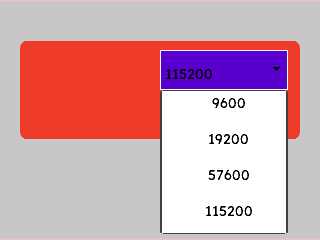
{
  "elements": [
    {
      "type": "box",
      "name": "Screen",
      "x": 0, "y": 0, "w": 320, "h": 240,
      "color": "0xC6C6C6",
      "children": [
        {
          "type": "box",
          "name": "SettingsPanel",
          "x": 20, "y": 40, "w": 280, "h": 100,
          "color": "0xEF3F2E",
          "corner": { "radius": 8, "filled": true },
          "children": [
            {
              "type": "label",
              "name": "BaudLabel",
              "x": 12, "y": 14, "w": 120, "h": 26,
              "color": "0xEF3F2E",
              "text": "Baud Rate:"
            },
            {
              "type": "dropdown",
              "name": "BaudDD",
              "x": 140, "y": 10, "w": 128, "h": 40,
              "color": "0x5900CC",
              "corner": { "radius": 4, "filled": true },
              "border": { "color": "0xFFFFFF", "width": 1 },
              "items": ["9600", "19200", "57600", "115200"],
              "selected": 3,
              "item_height": 36,
              "max_visible": 4
            }
          ]
        }
      ]
    }
  ]
}
mgui_widget_t* screen = mgui_allocate_widget(
    NULL, MGUI_WIDGET_BOX,
    (mgui_area_t){0, 0, 320, 240},
    MGUI_COLOR_LIGHT_GRAY);

mgui_widget_t* panel = mgui_allocate_widget(
    screen, MGUI_WIDGET_BOX,
    (mgui_area_t){20, 40, 280, 100},
    MGUI_COLOR_CRIMSON);
mgui_widget_radius_property(panel, 8, true);

mgui_widget_t* lbl = mgui_allocate_widget(
    panel, MGUI_WIDGET_LABEL,
    (mgui_area_t){12, 14, 120, 26},
    MGUI_COLOR_WHITE);
mgui_widget_label_set_text(lbl, "Baud Rate:");

static const char* bauds[] = {"9600", "19200", "57600", "115200"};

mgui_widget_t* dd = mgui_allocate_widget(
    panel, MGUI_WIDGET_DROPDOWN,
    (mgui_area_t){140, 10, 128, 40},
    MGUI_COLOR_PURPLE);
mgui_widget_radius_property(dd, 4, true);
mgui_widget_border_property(dd, MGUI_COLOR_WHITE, 1);
mgui_widget_dropdown_set_items(dd, bauds, 4);
mgui_widget_dropdown_set_selected(dd, 3);   // default: 115200
mgui_widget_dropdown_set_item_height(dd, 36);
mgui_widget_dropdown_set_max_visible_items(dd, 4);
Common Combinations
| Use Case | Setup |
|---|---|
| Language / locale | Dropdown + apply callback on MGUI_EVENT_CHANGE |
| Comms baud rate | Dropdown pre-selected to default, inside a settings panel |
| Unit selection | Dropdown (°C / °F / K) beside a temperature readout label |
| Theme selector | Dropdown change triggers mgui_widget_color_change calls |